
How to Create a FiveM Server globally — Complete Guide
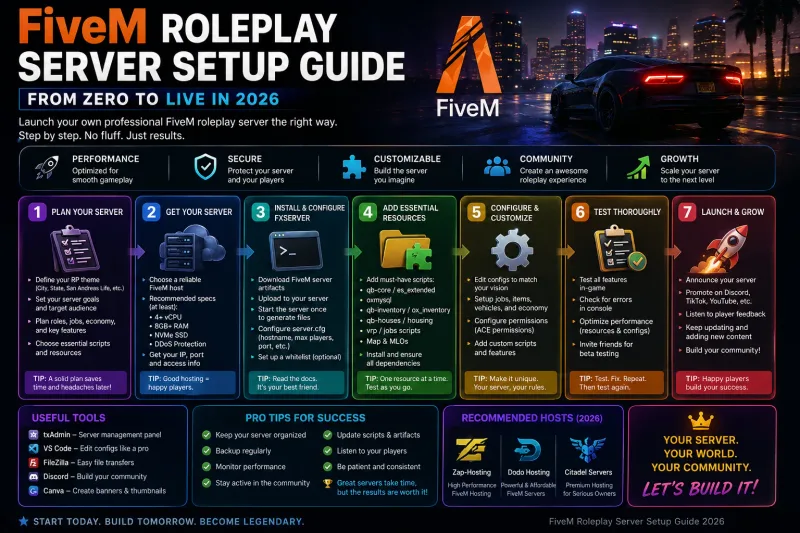
Setting up a FiveM server for the global community is easier than ever in 2026. With txAdmin's one-click framework installer and low-latency global hosting, your RP server can be live in under 10 minutes. Here's the complete step-by-step guide.
Step 1: Get Your FiveM License Key
Visit the Cfx.re Portal and sign in with your FiveM account. Generate a free server license key. This key authenticates your server with the FiveM network. Note: you need to have played FiveM for at least 14 days before you can create a server key.
Step 2: Choose Your Hosting Plan
For 32-slot RP servers, the FiveM 4GB plan (€ 560/mo) is sufficient. For 64-slot communities with 50+ resources, we recommend the 8GB plan (€ 1,050/mo). Large communities with 100+ slots should use the 16GB plan. All plans include global nodes for the lowest ping to servers.
Step 3: Initial txAdmin Setup
After ordering, your server deploys in under 60 seconds. Open the txAdmin panel URL provided in your control panel. On first launch, txAdmin will walk you through: choosing a server name, setting an admin password, selecting CFX Default or a popular base (we recommend QBCore or ESX for RP), and deploying the base resources.
Step 4: Choose Your Framework
ESX (Extended Roleplay Script) — the most popular framework with thousands of compatible resources. Best for traditional RP with jobs, housing, vehicles. QBCore — modern Lua-based framework, more performant than ESX, growing resource ecosystem. vRP — lightweight framework. Pick ESX if you want maximum resource compatibility, QBCore if you want better performance.
Step 5: Essential Resources to Install First
Start with these must-have resources: QB-Core or ESX framework, a phone system (QB-Phone or GCPhone), a garage/vehicle system, inventory (QB-Inventory or OX Inventory), a HUD, housing, jobs, police and EMS scripts, and an anti-cheat (WaveShield or EasyAdmin). Install one at a time and test after each. Don't dump 50 resources at once — you'll never debug it.
Step 6: Performance Tuning for global Players
Set sv_maxclients to match your plan. Configure OneSync population to the correct value. Set sv_enforceGameBuild to the current FiveM build. In server.cfg, increase sv_scriptHookAllowed if using custom scripts. Use the Performance Monitor in txAdmin to track resource CPU usage — remove or optimize anything consuming over 1ms per tick.
Step 7: Launch and Grow
Post your server on the Cfx.re server list, share in global gaming Discord communities, and create a Discord server for your community. Regular content updates keep players engaged. Check txAdmin's resource monitor weekly for performance regressions.
Running a FiveM server is a journey, not a destination. Start with a solid foundation, add resources gradually, and listen to your community. CyberNex's global infrastructure ensures global players get the lowest possible ping, and our 24/7 support team is here when you need help.
More in Fivem
Hands-on Guides
Deploy your server in 60 seconds
Get your Minecraft, FiveM, Rust, or CS2 server running on our global infrastructure before your coffee gets cold. Starting at € 3.50/month with instant provisioning, 17 Tbit DDoS protection, and 24/7 engineer support.